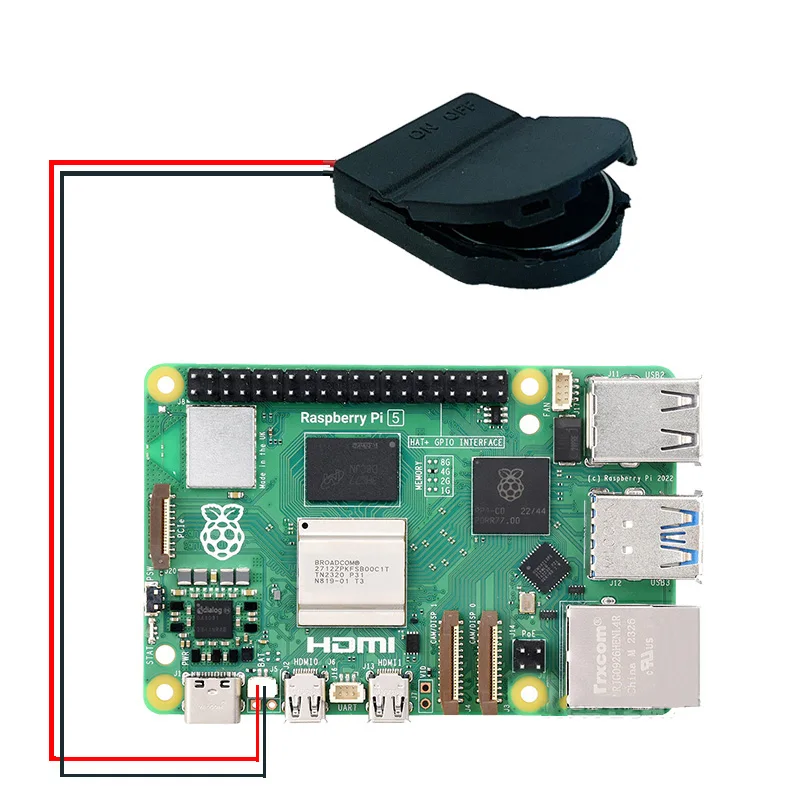
Raspberry Pi 5 RTC Battery Box (optional with battery or without battery)
【RPi5 Product Recommend】【Note】[][]Raspberry PI 5 RTC Battery Case (optional with battery or without battery)Raspberry Pi 5 Installation RTC Battery and RTC Battery Charging Tutorial:Step 1: Install the battery in the battery box. The battery model can be CR2032 without charging function or LIR2032 with charging function,Pay attention to the installation direction of the battery. Reverse installation may damage the raspberry piStep 2: Working With Raspberry Pi 5Step 3: Power up Raspberry Pi5Step
- Powerful, high-efficiency processing core for rapid script execution
- Onboard USB-to-UART bridge for clean code uploads and serial logging
- Full compatibility with Arduino IDE, VS Code, and MicroPython
- Rich array of GPIO, ADC, PWM, I2C, and SPI pins for broad expansion
- Built-in low-dropout (LDO) voltage regulator for stable board supply
- Compact, double-sided PCB layout ideal for tight project custom cases
- Integrated Wi-Fi and Bluetooth BLE transceivers for smart IoT control
Need help before you buy?
Call iBuyRobotics for product guidance, compatibility questions, bulk orders, or support.
(855) I-BUY-ROBO (855) 428-9762Use Cases
Microcontroller firmware writing, edge computing, wireless IoT remote control, sensor data logging, and central robot coordination.
Compatibility Notes
Compatible with Arduino IDE, VS Code (PlatformIO), Espressif IDF, MicroPython, and standard prototyping breadboards.
Frequently Asked Questions
It is fully compatible with standard platforms like the Arduino IDE, VS Code (PlatformIO), Espressif ESP-IDF, or MicroPython editors.
Yes, most chips in this class feature built-in Wi-Fi and Bluetooth dual-mode modules for wireless connectivity.
Yes, you can connect a regulated voltage source to the VIN and GND pins, or use the onboard micro-USB/USB-C power port.
Related Products
Other products in Battery Management Systems that you may find useful.