Need help choosing the right robotics product? Call iBuyRobotics: (855) I-BUY-ROBO | (855) 428-9762
RobotDyn

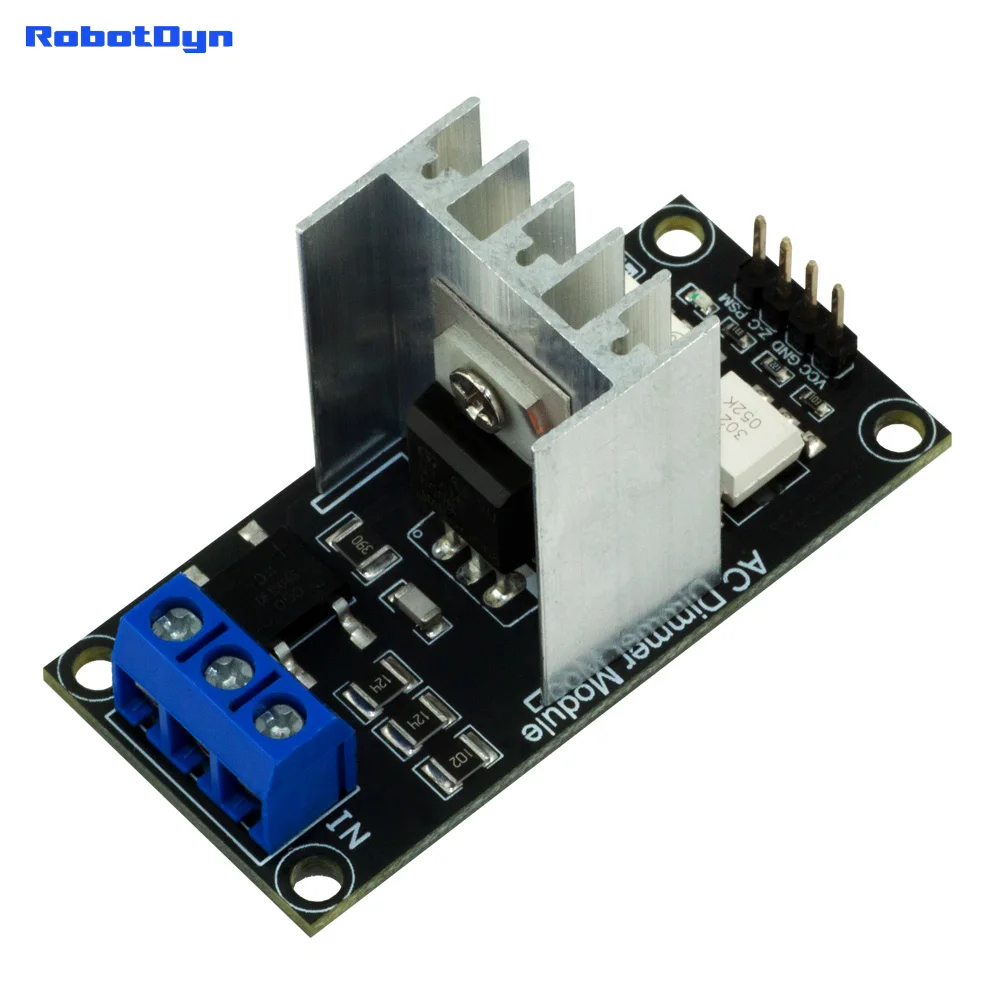
AC Light lamp dimming and motor Dimmer Module, 1 Channel, 3.3V/5V logic, AC 50/60hz, 220V/110V - 600V

RBDIMMER.COMTechincal support, library, community support for AC DimmerAC Dimmer Module for PSM control, 1 Channel, 3.3V/5V logic, AC 50/60hz, 220V/110V~600VProduct OverviewThe AC Dimmer is a DIY module—not a finished device—that you integrate into your project by connecting it to your microcontroller. Designed to regulate alternating current (AC) voltage, it safely handles up to 4~24A. Originally designed for smooth control of lamps and heating elements—not merely simple on/off switching—this v

$11.99
In Stock
Secure checkout
Fast shipping
30-day returns

Need help before you buy?

Call iBuyRobotics for product guidance, compatibility questions, bulk orders, or support.

(855) I-BUY-ROBO (855) 428-9762


RBDIMMER.COM

Techincal support, library, community support for AC Dimmer


AC Dimmer Module for PSM control, 1 Channel, 3.3V/5V logic, AC 50/60hz, 220V/110V~600V

Product Overview

The AC Dimmer is a DIY module—not a finished device—that you integrate into your project by connecting it to your microcontroller. Designed to regulate alternating current (AC) voltage, it safely handles up to 4~24A. Originally designed for smooth control of lamps and heating elements—not merely simple on/off switching—this versatile module also supports adjustable operation for fans, pumps, air purifiers, and more.

This dimmer is especially useful for smart home projects. With our comprehensive tutorials and user guides, you can build a fully customized solution. For example, you might:

  • Adjust lighting: Gradually turn lights on or off to create a comfortable ambiance.

  • Automate your home: Connect the module to cloud services like HomeAssistant or even control it with voice assistants.

  • Save energy: Program schedules for turning devices on and off, reducing energy consumption.

We provide extensive documentation and instructions not only for Arduino but also for other platforms. You can find guides on using the ESPHome component for integration and automation through HomeAssistant, as well as detailed instructions for connecting and configuring the Tasmota application. These resources ensure that whether you're using ArduinoESP32, or another platform, you have all the support you need.

Specification


Power

up to 400V/600V (4A~24A)

AC frequency

50/60 Hz

TRIAC

BTA16 — 600B / BTA24 — 600B

Isolation

Optocoupler

Logic level

3.3V/5V/12V

Zero point

Logic level

Modulation (DIM/PWM)

logic level ON/OFF TRIAC

Signal current

>10mA

Environment:

  • For indoor and outdoor use

  • Operating temperatures: −20°C to 80°C

  • Operating humidity: Dry environment only

ROHS3

Compliant


AC TRIAC Dimmer Module


🔌 CHOOSE YOUR INTERFACE

Feature

Standard (Phase Control)

DimmerLink (UART/I2C)

Interface

Zero-Cross + Gate signals

UART (115200) or I2C

Library Required

Yes (rbdimmerESP32.h)

❌ No library needed

Code Complexity

Interrupt handling, timers

3-4 bytes command

Flickering

Depends on code quality

✅ Guaranteed flicker-free

Platform Support

ESP32, Arduino (with library)

Any MCU with UART/I2C

Logic Levels

3.3V, 5V

1.8V, 3.3V, 5V

Best For

Advanced users, custom timing

Beginners, quick integration

⚠️ HOW TO IDENTIFY YOUR VERSION

When ordering, select carefully:

You Selected

You Will Receive

Interface Pins

4A Standard / 8A Standard

Dimmer with Phase Control

VCC, GND, Z-C, DIM

4A DimmerLink / 8A DimmerLink

Dimmer with built-in controller

VCC, GND, TX/SDA, RX/SCL

🎯 WHICH VERSION IS RIGHT FOR YOU?

✅ Choose STANDARD (Phase Control) if you:

  • Already use rbdimmerESP32 library in your project

  • Need lowest possible cost

  • Want direct hardware control

  • Building multi-phase systems

  • Experienced with interrupt-based programming

✅ Choose DIMMERLINK (UART/I2C) if you:

  • Want plug-and-play simplicity

  • Need guaranteed flicker-free operation

  • Using Raspberry Pi, Orange Pi, or any Linux SBC

  • Working with platforms without dimmer libraries

  • Building smart home with HomeAssistant/ESPHome

  • Want to control via USB-UART adapter from PC

  • Prefer minimal code (literally 5 lines!)

📋 GENERAL SPECIFICATIONS (Both Versions)

Parameter

4A Version

8A Version

Max Current

4A

8A

Max Power (220V)

880W

1760W

Max Power (110V)

440W

880W

Input Voltage

110-240V AC, 50/60Hz

Control Voltage

3.3V / 5V (Standard) — 1.8V / 3.3V / 5V (DimmerLink)

Isolation

Optocoupler isolated

Mounting

Standard 0.1" (2.54mm) pins

🔧 STANDARD VERSION — Phase Control Interface

How It Works

The Standard version outputs two signals:

  • Z-C (Zero-Cross) — pulse at each AC zero crossing

  • DIM (Gate) — you send trigger pulse to fire TRIAC

Your microcontroller must:

  1. Detect zero-cross interrupt

  2. Calculate delay based on desired brightness

  3. Send precisely-timed gate pulse

  4. Repeat 100-120 times per second

Requires Library

We provide rbdimmerESP32.h library that handles all timing complexity.

// Arduino/ESP32 Example (with library):
#include <rbdimmerESP32.h>

dimmerLamp dimmer(4, 2); // Gate pin, ZC pin

void setup() {
dimmer.begin(NORMAL_MODE, ON);
}

void loop() {
dimmer.setPower(50); // 50%
}

Supported Platforms

✅ ESP32, ESP8266

Full library support

✅ Arduino Uno/Mega

With limitations

⚠️ Raspberry Pi

Requires precise timing — difficult

❌ Most other platforms

No library available

🚀 DIMMERLINK VERSION — UART/I2C Interface

Revolutionary Simplicity

DimmerLink has a dedicated Cortex-M+ microcontroller built into the dimmer board. This controller handles ALL timing-critical operations internally:

  • ✅ Zero-cross detection

  • ✅ Phase angle calculation

  • ✅ TRIAC firing with microsecond precision

  • ✅ Automatic 50/60Hz detection

  • ✅ Multiple dimming curves

You just send simple commands!

No Library Required — Ever!

Arduino Example (I2C):

#include <Wire.h>

void setup() {
Wire.begin();
}

void loop() {
Wire.beginTransmission(0x50);
Wire.write(0x10); // Brightness register
Wire.write(50); // 50%
Wire.endTransmission();
delay(1000);
}

Python Example (Raspberry Pi):

from smbus2 import SMBus

bus = SMBus(1)
bus.write_byte_data(0x50, 0x10, 50) # Set 50%

Even from Terminal (Linux):

i2cset -y 1 0x50 0x10 50 # Set brightness to 50%

DimmerLink Key Advantages

🔇 FLICKER-FREE

Hardware handles timing — impossible to flicker

📚 NO LIBRARIES

Works with ANY programming language

🌐 UNIVERSAL

Arduino, ESP32, Raspberry Pi, STM32, PIC, anything!

⚡ 1.8V-5V Logic

Direct connection to any MCU

📊 3 Dimming Curves

LINEAR, RMS (incandescent), LOG (LED)

🔄 Auto Frequency

Detects 50/60Hz automatically

🔌 Dual Interface

Switch between UART and I2C anytime

Supported Platforms (ALL of them!)

Platform

UART

I2C

Logic Level

Arduino Uno/Nano/Mega

5V

ESP32 / ESP8266

3.3V

Raspberry Pi 3/4/5

3.3V

Orange Pi / Banana Pi

3.3V

STM32 Blue Pill

3.3V

Raspberry Pi Pico

3.3V

ATtiny / nRF52 / MSP430

1.8V

USB-UART adapter (PC)

Any

💡 APPLICATION EXAMPLES

🏠 Smart Home

Both versions work with HomeAssistant. Standard uses ESPHome dimmer component, DimmerLink uses simpler I2C/UART component.

💡 Lighting

Incandescent (RMS curve), Dimmable LED (LOG curve), Halogen (RMS curve)

🔥 Heating

Boilers, water heaters, 3D printer heated beds, industrial heating elements

⚙️ Motors

Universal/brush motors (drills, mixers), fans. ⚠️ NOT for induction motors!

⚡ QUICK COMPARISON: Code Complexity

Setting 50% Brightness

Standard Version (ESP32 with library)

#include <rbdimmerESP32.h>
dimmerLamp dimmer(4, 2);
void setup() {
dimmer.begin(NORMAL_MODE, ON);
}
void loop() {
dimmer.setPower(50);
}

Requires: Library installation, correct pin configuration, understanding of interrupt modes

DimmerLink Version (ANY platform)

Wire.beginTransmission(0x50);
Wire.write(0x10);
Wire.write(50);
Wire.endTransmission();

Requires: Nothing! Just 4 lines, any I2C-capable device

❓ FAQ

Q: Can I use Standard version with Raspberry Pi?

A: Technically yes, but very difficult. Raspberry Pi OS is not real-time, causing timing issues and flickering. DimmerLink is strongly recommended for Raspberry Pi.

Q: Is DimmerLink compatible with existing rbdimmerESP32 projects?

A: No, they use different interfaces. DimmerLink uses UART/I2C commands instead of phase control signals.

Q: Can I switch DimmerLink between UART and I2C?

A: Yes! Send a command to switch interface. Setting is saved in memory.

Q: What if I need to control multiple dimmers?

A: Standard: Each dimmer needs separate GPIO pins
DimmerLink (I2C): Up to 100+ dimmers on same 2 wires (different addresses)

Q: Which version has less flickering?

A: DimmerLink — zero flickering guaranteed. Standard version depends on your code quality and MCU performance.

📦 PACKAGE CONTENTS

Standard Version

1× AC Dimmer Module (4A or 8A)
Pin headers (soldered)

DimmerLink Version (UART/I2C)

1× AC Dimmer Module with DimmerLink controller (4A or 8A)
Pin headers (soldered)

️ SAFETY WARNING

  • This is a DIY module for experienced users

  • Works with dangerous AC mains voltage (110-240V)

  • Proper isolation and enclosure required

  • Follow local electrical codes

  • Not for use by children

Choose wisely: Standard for advanced timing control, DimmerLink for simplicity and reliability!


1. Dimmer module 8A

New dimmer module for load AC power 8A-400V. With RC filter. Dimension: 28.5mm(1.12")x57mm(2.24")

-----------------------------------------------------------------------------------------------------------------------------------------------------------------------------------------------------------------

2. Dimmer module 4A

Small size DIY dimmer module for load AC power 4A-400V. With RC filter. Dimension: 16mm(0.63")x50mm(1.97")

Suitable for power load less 800W: Lamp, a small fun, water pump, tool.


-----------------------------------------------------------------------------------------------------------------------------------------------------------------------------------------------------------------

Dimmer Module embedded, 1 Channel, 3.3V/5V logic, 16A, 600V

=====================================================================================================


.