

What You'll Discover on Your Robotics Journey
Embarking on a robotics project can feel like a big leap, but it's an incredibly rewarding one. This guide is designed to break down the journey into manageable steps, ensuring you gain confidence and practical skills along the way. We'll cover everything from sparking an idea to seeing your robot move for the first time.
Idea Generation & Planning
Learn how to brainstorm compelling robot ideas, define your project's scope, and lay a solid foundation before you even pick up a tool.
Core Components Explained
Demystify the essential hardware – from motors and sensors to the 'brain' of your robot – and understand how they all work together.
Bringing Your Robot to Life (Coding)
Get a clear introduction to programming your robot, understanding the logic, and writing the code that makes it perform its tasks.
Troubleshooting & Community Support
Learn common pitfalls and how to overcome them, plus discover the vibrant community ready to help you succeed.
 Every great robot starts with a well-designed circuit board.
Is Robotics Right for You? Let's Find Out!
Many people are fascinated by robots but aren't sure if they have the technical background to build one. The truth is, robotics is incredibly accessible, especially with today's tools and resources. Whether you're a curious hobbyist, an aspiring engineer, or just looking for a new challenge, there's a place for you in the world of robotics.
It's less about knowing everything upfront and more about a willingness to learn and experiment. Robotics combines elements of mechanics, electronics, and programming, offering a diverse skill set to explore. Don't worry if you're new to some of these areas; we'll guide you through the basics.
What sparks your interest in robotics the most?
You're a Problem Solver!
Robotics is an excellent field for applying innovative solutions to challenges, from automating tasks to exploring new environments. Focus on projects with clear objectives. Consider starting with a robot that can navigate a maze or sort objects.
You're a Creative Builder!
Robotics offers endless possibilities for design and customization. You'll love bringing unique mechanical and aesthetic ideas to life. Explore projects like artistic robots or custom-designed robotic arms.
You're a Lifelong Learner!
Robotics is a fantastic way to learn about electronics, programming, and mechanical engineering all at once. Start with foundational projects that teach core concepts, like building a simple line-following robot.
If any of these resonate with you, then yes, robotics is definitely for you! To explore further, check out our guide: Is Robotics Right for Me? A Quick Intro.
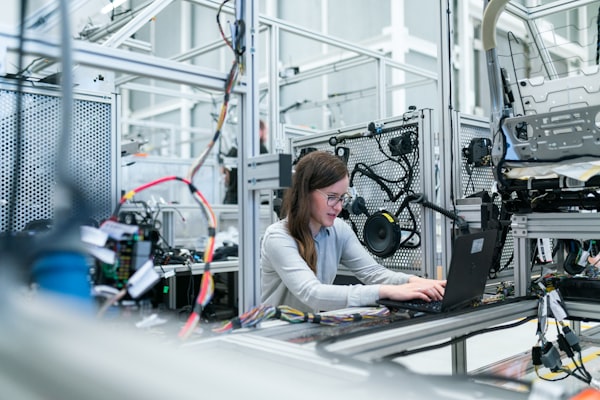 Understanding how different robot parts connect is key to successful building.
What Are the Essential Parts of a Robot?
At its heart, every robot, from the simplest toy to the most complex industrial arm, shares a few fundamental components. Think of them as the robot's body, brain, senses, and muscles. Understanding these basics is your first step to building anything.
- Chassis/Frame: This is the robot's physical structure, providing support and housing for all other components. It can be made from anything from cardboard to aluminum.
- Power Source: Usually batteries, this supplies electricity to all parts of the robot. Proper power management is crucial for performance and safety.
- Controller (Brain): This is the electronic component that processes information and sends commands. It could be a simple microcontroller or a more powerful single-board computer.
- Actuators (Muscles): These are the parts that make the robot move or perform actions, most commonly motors (DC, servo, stepper) or solenoids.
- Sensors (Senses): These allow the robot to perceive its environment, gathering data like distance, light, temperature, or touch.
Each component plays a vital role in the robot's overall function. Without a sturdy chassis, the parts can't be held together. Without power, nothing moves. Without a controller, there's no intelligence. Actuators provide movement, and sensors provide awareness. A balanced design across all these areas leads to a successful robot.
Ready to dive deeper into the hardware? Explore our detailed guide: Bringing Your Robot to Life: Motors, Sensors & Actuators.
Microcontroller or Single Board Computer: Which Brain for Your Bot?
Choosing the right 'brain' for your robot is one of the most critical decisions you'll make. The two main contenders for hobbyist and educational robotics are microcontrollers (MCUs) and single-board computers (SBCs). Each has its strengths and is suited for different types of projects.
| Feature | Microcontroller (e.g., Arduino Uno) | Single Board Computer (e.g., Raspberry Pi) |
|---|---|---|
| Cost (Typical) | $10 - $50 | $35 - $100+ |
| Complexity | Simpler, easier for beginners | More complex, like a mini-PC |
| Processing Power | Lower, ideal for specific tasks | Higher, capable of complex computations |
| Operating System | No OS (bare metal) or simple RTOS | Full Linux OS (e.g., Raspbian) |
| Connectivity | Basic I/O, USB, Serial | USB, Ethernet, Wi-Fi, Bluetooth, HDMI |
| Best For | Repetitive tasks, real-time control, simple sensors, low power projects | Complex tasks, image processing, AI, networking, user interfaces, high data throughput |
To make a more informed decision, read our in-depth comparison: Microcontroller vs. Single Board Computer: Which is Best?
From Concept to Creation: Your Project Steps
Building a robot is a journey, not a single event. Breaking it down into logical steps makes the process less daunting and more enjoyable. Here’s a typical flow for a robotics project, from initial idea to a working prototype.
This iterative process is where the real learning happens. Don't be afraid to go back a step if something isn't working as expected. It's all part of the adventure!
Your First Project Readiness Checklist
0 of 5 completedFeeling ready? Our Building Your First Robot: A Step-by-Step Plan guide offers a comprehensive framework.
Why Join the Robotics Community?
Robotics is a field that thrives on collaboration and shared knowledge. You're not alone on this journey; a vast and supportive community is waiting to help you learn, grow, and celebrate your successes.
Engaging with others provides inspiration, solutions to tricky problems, and a sense of belonging. Share your progress, ask questions, and contribute your own insights as you gain experience.
This kit includes a popular microcontroller, essential sensors, motors, and a sturdy chassis, all selected for compatibility and ease of use for first-time builders. It's the perfect launchpad for your first project.
Don't forget to explore our Community Showcase to see what amazing robots others have built!
 The intricate details of a robotic hand, ready for action.
Test Your Robotics Readiness!
You've absorbed a lot of information, and that's fantastic! Before you jump into your first build, let's do a quick check to see how well you've grasped some of the core concepts we've discussed. No pressure, just a fun way to reinforce your learning.
Understanding these fundamental ideas will give you a solid foundation as you move forward with more complex topics like Coding Your Robot: From Basics to Advanced Control or specific component deep-dives like How Do Servo Motors Actually Work?.
Which component is primarily responsible for allowing a robot to perceive its environment?
Where Do You Want to Go Next?
Your robotics adventure is just beginning! We've laid the groundwork, and now it's time to choose your next path. Whether you want to explore different robot types, understand specific components, or get inspired by project ideas, we have a resource for you.
Explore Robot Types
Discover the vast array of robots you can build, from mobile platforms to robotic arms, and find inspiration for your next project.
See Robot Types →Master Core Components
Deep dive into the specifics of motors, sensors, and other essential parts that bring your robot to life.
Learn Components →Get Project Ideas
Need inspiration? Browse a curated list of exciting robotics projects perfect for beginners and intermediate builders.
Find Project Ideas →