What You'll Discover in This Guide
Your Robotics Personality
Understand what kind of robotics enthusiast you might be, whether you're a builder, a coder, or an innovator, and find paths tailored to your interests.
Core Robot Components
Get a clear, jargon-free overview of the essential parts that make up almost any robot, from its 'brain' to its 'muscles' and 'senses'.
Your First Steps & Resources
Learn about the practical first steps to take, what tools you might need, and where to find reliable resources to kickstart your robotics journey.
Overcoming Beginner Hurdles
Address common concerns like 'Is robotics too hard?' and discover strategies to tackle challenges, ensuring a rewarding and enjoyable learning experience.
 Exploring the intricate world of circuit boards and electronic components.
What Kind of Robot Builder Are You?
Robotics is a vast field, and people come to it from all sorts of backgrounds and with different goals. Before you dive into specific components or coding languages, it's helpful to understand what truly excites you about robots. Are you fascinated by the mechanics, the programming, or the real-world problems they can solve?
Thinking about your primary interest can help us point you towards the most engaging starting points. There's no single 'right' way to get into robotics, only the path that best fits your curiosity.
What's your primary motivation for exploring robotics?
You're a Builder!
Great! Your journey will likely involve hands-on assembly, understanding mechanical structures, and working with motors and sensors. You'll enjoy seeing physical creations come to life. Consider starting with beginner robotics kits that focus on construction.
You're a Coder!
Excellent! Your path will delve into the logic and algorithms that make robots smart. You'll enjoy learning languages like Python or C++ and seeing your code control physical actions. Explore platforms like Arduino or Raspberry Pi, which are perfect for learning to code robots.
You're an Innovator!
Fantastic! You're driven by purpose. Your journey might combine building and coding to create solutions for specific challenges, whether it's automating a task or inventing a new device. Look into project-based learning and exploring different types of robots to inspire your next big idea.
What Makes a Robot Tick? The Core Ingredients
At its heart, every robot, from a simple toy car to a complex industrial arm, shares a few fundamental components. Think of them as the robot's brain, muscles, and senses. Understanding these basics is your first step to demystifying how robots work.
- The Brain (Controller): This is the computer that processes information and makes decisions. It could be a tiny microcontroller or a powerful single-board computer.
- The Muscles (Actuators): These are the parts that make the robot move or perform actions, like motors, servos, or hydraulic cylinders.
- The Senses (Sensors): These allow the robot to perceive its environment, gathering data about light, distance, temperature, or touch.
- The Structure (Chassis/Frame): This is the physical body that holds everything together and gives the robot its form.
- The Power (Battery/Supply): Every robot needs energy to operate, typically from batteries or a direct power source.
These components work together in a continuous loop: sensors gather data, the controller processes it and makes decisions, and actuators execute actions. For a deeper dive into these essential parts, check out our guide on Bringing Your Robot to Life: Motors, Sensors & Actuators.
A microcontroller is essentially a small, self-contained computer on a single integrated circuit. It's designed to perform specific tasks and control particular functions within a larger system. Unlike a desktop computer, which is general-purpose, a microcontroller is optimized for embedded applications, meaning it's built into devices to control them. Think of it as the tiny, dedicated brain inside your washing machine, remote control, or, of course, your robot. Popular examples include Arduino boards, which are fantastic for beginners due to their ease of use and vast community support.
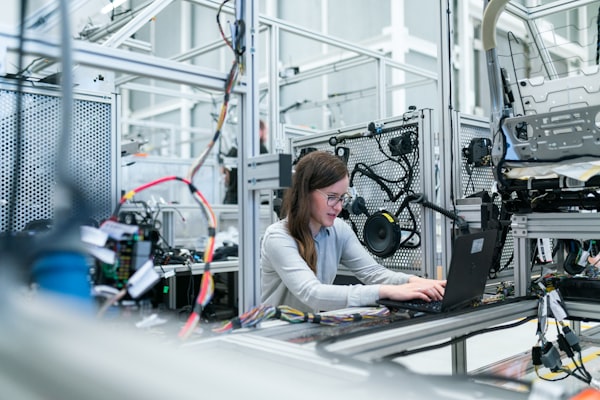 Essential components like microcontrollers, sensors, and wires form the building blocks of any robot.
Is Robotics Hard? Breaking Down the Learning Curve
It's common to feel intimidated by robotics. The combination of electronics, mechanics, and programming can seem like a lot to learn all at once. However, the beauty of robotics is that you can start small and build your knowledge step by step. It's more about curiosity and persistence than innate genius.
Your First Steps: What to Expect on Your Robotics Journey
Embarking on robotics can feel like a grand adventure. Here's a simplified roadmap of what your initial steps might look like, designed to make the process manageable and fun.
Explore & Get Inspired
Before you buy anything, spend some time exploring what's possible. Watch videos of robots in action, browse project showcases, and read about different types of robots. This helps you identify what truly sparks your interest and gives you a vision for your own projects. Don't worry about the 'how' yet, just focus on the 'what if'.
Action: Browse our Cool Robotics Project Ideas for Beginners for inspiration.
Choose Your First Platform
For beginners, a great starting point is an all-in-one kit or a popular development board like Arduino or Raspberry Pi. These platforms have extensive documentation and communities. An Arduino kit, for example, often comes with a microcontroller, sensors, motors, and clear instructions to build your first simple robot.
Action: Research beginner-friendly robotics kits or microcontroller starter packs.
Learn the Basics of Coding
Robots need instructions! Even if you're a hardware enthusiast, a basic understanding of programming is crucial. Many beginner platforms use simplified coding environments (like Arduino IDE with C++ or Python for Raspberry Pi). Start with simple tasks: making an LED blink, reading a sensor value, or controlling a motor.
Action: Complete a few introductory coding tutorials for your chosen platform.
Build Your First Simple Project
This is where theory meets practice! Start with a very simple project, like a line-following robot, a simple obstacle avoidance robot, or a robotic arm controlled by a joystick. Don't aim for perfection; aim for completion and learning. Each small success builds confidence and knowledge for your next, more ambitious project.
Action: Follow a tutorial to build a functional, basic robot project.
Why Robotics Matters: More Than Just Gadgets
Robotics isn't just a hobby; it's a rapidly growing field with profound impacts across industries and daily life. Understanding robotics means understanding the future.
Common Robotics Scenarios & Your Path Forward
Now that you have a better idea of what robotics entails, let's look at some common scenarios and how you might approach your learning, depending on your interests and goals.
Path for the Hands-On Builder
If you love assembling, wiring, and seeing physical mechanisms work, your journey will be very tactile. You'll enjoy understanding how gears mesh, how motors provide torque, and how sensors detect physical changes. Your focus will be on mechanical design, electronics assembly, and basic control systems.
Recommended Start: Begin with a comprehensive robotics kit that includes a chassis, motors, wheels, and a basic microcontroller. These kits often come with step-by-step assembly instructions and introductory coding examples.
This kit provides a robust chassis, powerful servo motors, and a versatile Arduino-compatible board, perfect for learning mechanical assembly and basic programming simultaneously.
Next Steps: Experiment with different movement systems (wheels, tracks, legs), explore various types of motors (DC, servo, stepper), and learn about power management for your creations.
Path for the Code Enthusiast
If the logic, algorithms, and software behind robotics captivate you, your journey will be heavily focused on programming. You'll learn how to write code to interpret sensor data, make decisions, and control actuators. Languages like Python (especially with Raspberry Pi) or C++ (with Arduino) will be your primary tools.
Recommended Start: Get a microcontroller or single-board computer (SBC) development board, like an Arduino Uno or Raspberry Pi 4, along with a basic sensor pack. Focus on coding tutorials that teach you how to interact with hardware through software.
A powerful single-board computer ideal for learning Python, advanced robotics programming, and even running AI/ML applications on your robot.
Next Steps: Dive into more complex algorithms for navigation, object detection, or even machine learning. Explore different communication protocols (I2C, SPI, UART) and how to integrate libraries for advanced functionalities.
Path for the Problem Solver
If you're driven by the desire to create solutions, automate tasks, or invent new devices, your path will be project-oriented. You'll likely combine elements of both building and coding, focusing on how different components and software can work together to achieve a specific goal. Your motivation is the end product and its utility.
Recommended Start: Identify a simple problem you want to solve (e.g., a robot that waters plants, a smart home device, an automated pet feeder). Then, research existing projects or kits that address similar challenges. This approach helps you learn components and coding in context.
An excellent kit for problem-solvers, allowing you to build a mobile robot capable of line-following, obstacle avoidance, and remote control – perfect for understanding integrated systems.
Next Steps: Learn about project planning frameworks, rapid prototyping techniques, and how to iterate on your designs. Explore advanced sensors and actuators that can enhance your robot's capabilities to solve more complex problems.
Demystifying Robotics Jargon: Quick Answers
Robotics, like any specialized field, comes with its own set of terms. Don't let them intimidate you! Here are some common questions and quick answers to help you navigate the language of robotics. For a more comprehensive resource, visit our Robotics Jargon Buster: Interactive Glossary.
What's the difference between a microcontroller and a microcomputer?
A microcontroller (like Arduino) is a small, low-power computer designed for specific control tasks, often in real-time. It's great for simple, repetitive actions. A microcomputer or Single Board Computer (SBC) like Raspberry Pi is more powerful, runs a full operating system, and is better for complex tasks, networking, and user interfaces. Think of a microcontroller as a dedicated appliance controller, and an SBC as a tiny desktop computer.
What is an actuator?
An actuator is a component that converts energy (electrical, hydraulic, pneumatic) into mechanical motion. In robotics, this usually means motors (DC, servo, stepper) that move parts of the robot, but it can also include things like solenoids or pneumatic cylinders.
What does 'open-source' mean in robotics?
Open-source refers to hardware designs or software code that is publicly available, allowing anyone to study, modify, distribute, and make it. This fosters collaboration and innovation. Many popular robotics platforms, like Arduino and ROS (Robot Operating System), are open-source, making them accessible and adaptable for beginners.
What's a sensor used for?
A sensor is a device that detects and responds to some type of input from the physical environment. It converts physical phenomena (like light, temperature, distance, pressure) into an electrical signal that a microcontroller or computer can understand and process. Sensors are the 'eyes and ears' of your robot.
Ready to Dive Deeper?
We hope this introduction has helped you understand if robotics is the right path for your curiosity! The world of robotics is incredibly rewarding, offering endless opportunities for learning, creativity, and problem-solving. Don't hesitate to take that first step.
Here are some next steps to continue your exploration:
Your Robotics Project Adventure Starts Here!
Explore our main learning hub for a comprehensive overview of all our guides and resources.
Cool Robotics Project Ideas for Beginners
Ready to build? Find inspiring and achievable projects to kickstart your hands-on experience.
What Kinds of Robots Can You Build?
Discover the diverse world of robots and envision what you might create next.